gTrader SuiteNext-Gen Trading Platform for Global Markets

    Gato gTrader Suite

    A multi-asset trading platform that is easy to use. Risk controls are built in. It runs fast on Desktop, Web, and Mobile. Equities, options, futures, and FX sit in one blotter, and every device reads the same order, position, and buying-power record, so a trader who starts an order at the desk can finish it on a phone without a refresh or a second login.

    SYNCING
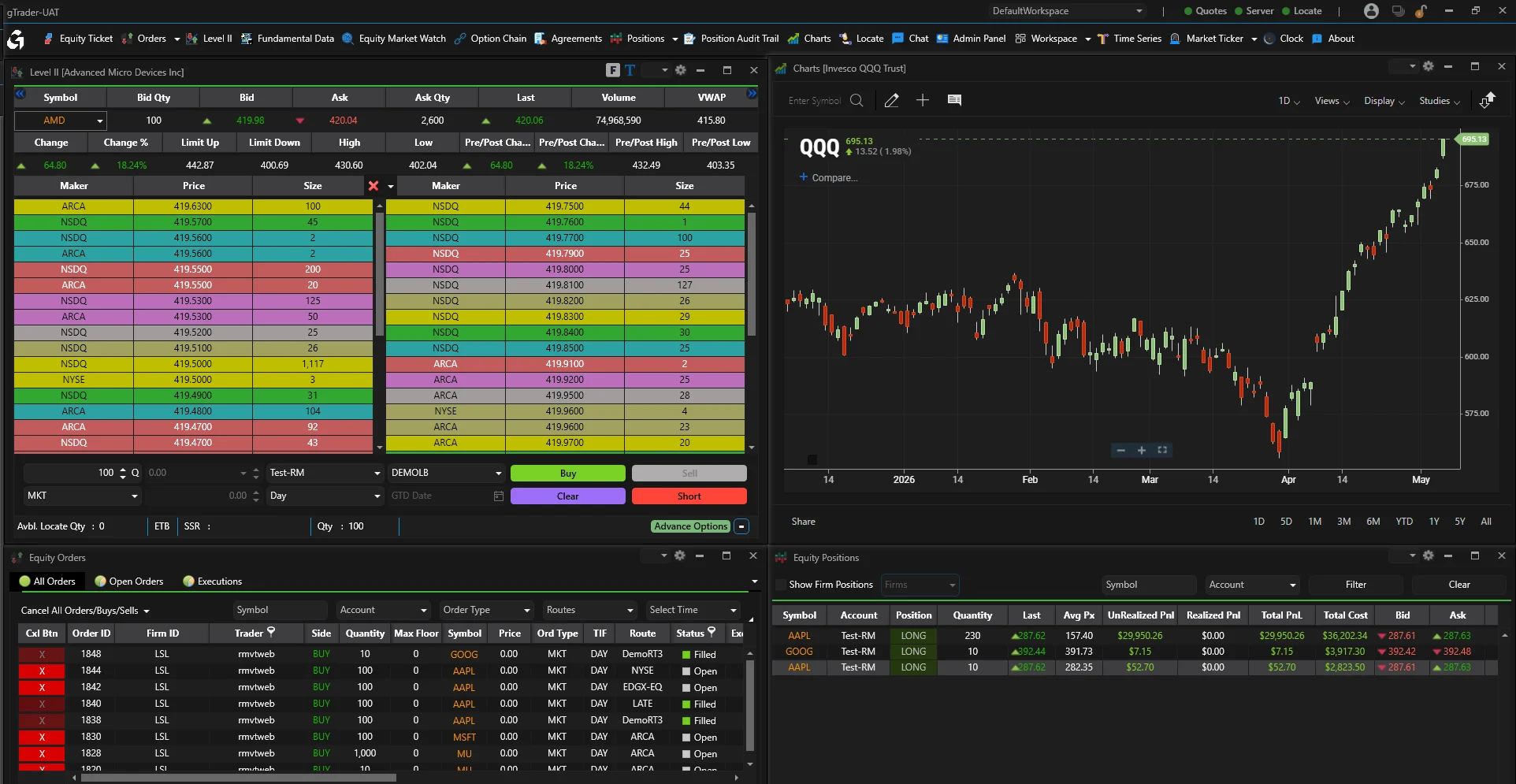
    gTrader Desktop terminal
    $ AAPL +2.4%
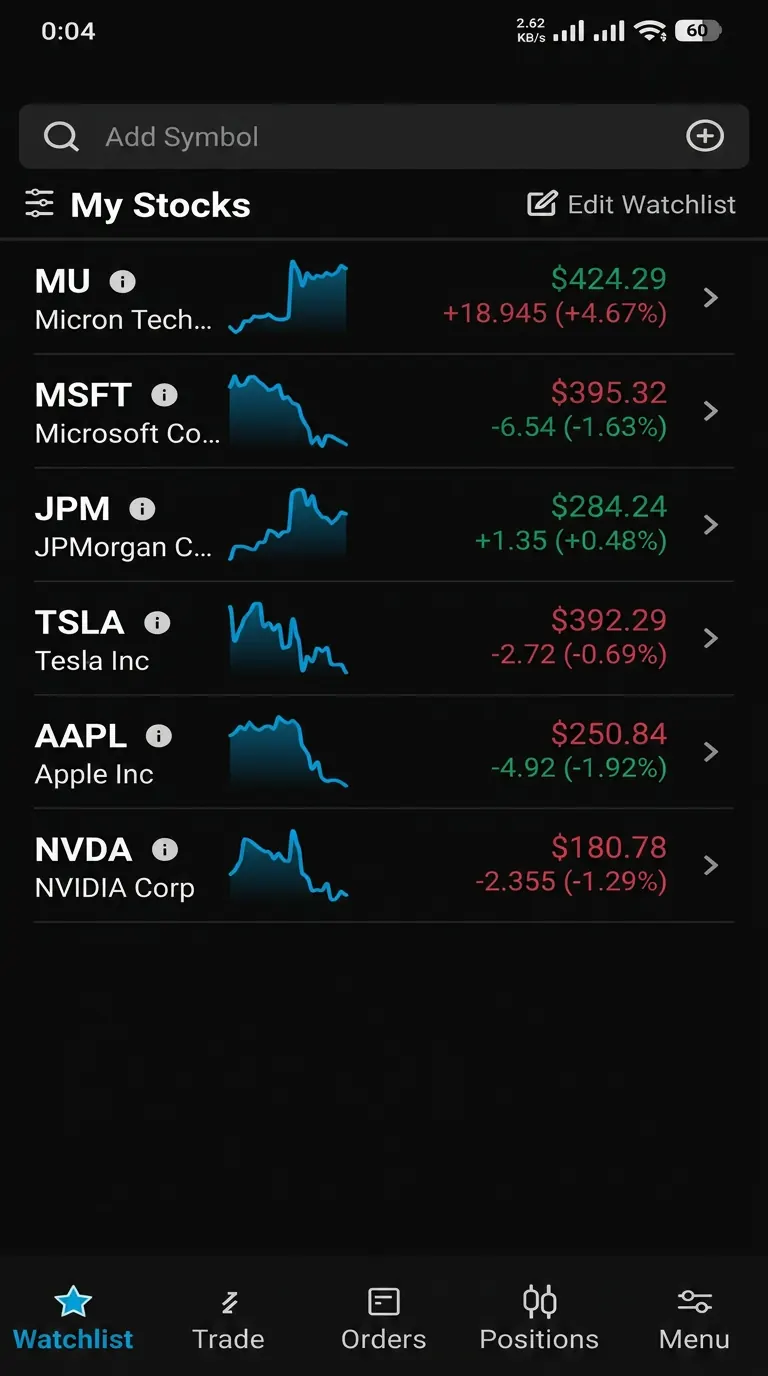
    gTrader Mobile

    At a Glance

    • 01

      Full Trading

    • 02

      Your Setup

    • 03

      Fast Data

    • 04

      Portfolio View

    • 05

      White Label

    • 06

      Strong Charts

    • 07

      One Experience

    • 08

      Built-In Risk

    Capabilities

    A pro screen for trading equities and options. Fast fills. It grows with you.

    Trade many asset types in US and global markets

    Real-time Level I and Level II market data

    Charts with over 90 studies you can set up

    Set your own hot keys and hot buttons

    Build your own alerts

    Track positions and your whole portfolio

    Watch lists you can shape, plus your own alerts

    Trade multi-leg options spreads

    Set up spread order entry the way you want

    See every call and put strike for one symbol

    Flag in-the-money options so choices are quicker

    API Capabilities

    Next step

    See gTrader Suite in action

    Walk through gTrader Suite with our team on a live environment using your workflows, venues, and reporting obligations.

    More in Trading & Execution

    Continue exploring the family

    About gTrader Suite

    How firms use gTrader Suite

    gTrader is the trading screen for the Gato suite. Desktop, web, and mobile all read the same orders, rules, and risk checks.

    Order entry spans market, limit, stop, stop-limit, bracket, and multi-leg option tickets, with time-in-force and per-group permissions set by configuration rather than code.

    Charts, option chains, and the blotter read live records, so quotes, working orders, and buying power update on the same tick a trader acts on.

    Firms trade equities, options, futures, and FX here. Market data, order entry, and positions sit in one place.

    • Desktop, web, and phone read one order and position record.
    • Equities, options, futures, and FX in one blotter.
    • Risk limits live on the server, never in the client.
    • Set brand, layouts, and access per firm and per group.
    • Shape order types, watch lists, option chains, and position views.
    • A trader's layout and hotkeys follow them between devices.
    • One screen shows every route, state change, and fill.

    Trading screens are judged on small things. How fast does a partial fill show up? Does the option chain stay quick at the open? Does the phone show the same positions as the desk? The answers come from where the data lives.

    gTrader reads the same records as gHub and gPrecision. There is no nightly job to sync the front end. There is no separate position file for mobile.

    Firms can also give gTrader to their own clients. Access rules set what each group sees and does. One setup serves many audiences.

    Rollouts go desk by desk. One desk moves while the rest stay put. Both read one order record. So positions and buying power agree the whole time. No cut-over weekend.

    Support work drops after the move. A client, a trader, and risk staff see one record. It has one history. A question becomes a lookup.

    Every order passes through the same server-side check before it reaches the market, whether it originates from the desktop client, a browser session, or an API integration. If a limit would be breached, the order is rejected at the gateway — not flagged after the fact. Limit configuration lives in gPrecision, so risk and trading teams always see the same numbers.

    Layouts are set once and shared. A desk template can define watch lists, order tickets, option chains, and position views. New traders start from it instead of building a screen from scratch.

    Order entry covers the basics and the rest. Market, limit, stop, and stop-limit sit next to bracket orders, multi-leg options, and time-in-force choices. What a group can send is a permission, not a code change.

    Charts read the same history as the blotter. A trader can move from a fill on the blotter to the chart around it without leaving the screen.

    Alerts stay useful. Price, position, and margin alerts arrive on the device a trader is using, and each alert links to the record behind it.

    To offer gTrader to outside clients, admins create a client-facing group with its own branding, order types, market data entitlements, and default layout — separate from the group used by internal desks. Because both run on the same deployment, updates and risk controls roll out to everyone at once, with no separate environment to maintain.

    Onboarding a new trader is quick. Access is granted by group, so entitlements, limits, and layout arrive together on the first login.

    Market data stays under your contracts. Quotes, depth, option chains, and history come from the feeds you license, and entitlements are applied per group, so a professional desk and a retail client can share one deployment without sharing one data package.

    Multi-asset work happens on one ticket. A trader can send an equity order, a multi-leg option spread, a futures order, and an FX order without switching applications, and the resulting positions land in one portfolio view instead of four.

    Performance is measured where it matters. The option chain, the blotter, and the position view all read live records, so the numbers a trader acts on at the open are the same numbers risk and operations see at that moment.

    Operations teams get the same picture. Every route, state change, cancel, replace, and fill appears on one screen with its timestamps, which is what makes an end-of-day question a lookup rather than a reconstruction.

    Which asset classes can traders work in gTrader?

    US and global equities, listed options, futures, and FX. One blotter, one position view. Symbol and account data is shared. So cross-asset exposure comes from one set of records.

    Is there a browser and mobile version?

    Yes. Desktop, web, and mobile share the same rules and order state. A trader can start an order in one and finish it in another. No extra step in between.

    Can gTrader be white-labelled for our clients?

    Yes. Set branding, layouts, access rules, and order types per firm and per group. That is how firms give it to their own clients.

    How are pre-trade risk limits enforced in the front end?

    gPrecision checks limits on the server, on the order path. The client never holds the limit. So a changed screen cannot skip a credit, position, or restricted-list check. The trader just sees the reason.

    Can traders keep their own layouts?

    Yes. A trader's layout, watch lists, and hotkeys are saved to their profile and follow them between desktop, web, and mobile. Desk templates set the starting point.

    What order types can we enable?

    Market, limit, stop, stop-limit, bracket, and multi-leg option orders, with the usual time-in-force choices. Each group only sees the types you allow.

    Can gTrader be deployed to our retail end clients?

    Yes. Branding, order types, market data access, and default layouts are set per user group. That is how firms run one setup for internal desks and outside clients at once.

    What market data does gTrader support?

    Live quotes, depth, and option chains from the feeds you license. Charts read history too. Your data deals stay yours. gTrader shows only what you may show.

    Does the mobile app show the same blotter as the desktop?

    Yes. Desktop, web, and mobile read one record. A fill that lands while a trader is away looks the same on each device. There is no mobile file to fix.

    Can we run gTrader alongside our current front end?

    Yes. Desks can move one at a time. Both screens read the same order data. Positions and buying power stay in step. There is no single cut-over date.