
One order book, one trading front end, and one link to global venues. Built for fast, institutional-grade execution.
Order Flow, Connectivity & Execution
Every order runs through three layers: an OMS, a trading front end, and FIX links to venues.
Buy them from three vendors and the same order lives in three places. That is where broken fills and messy audit trails start.
 Opening Markets, Unlocking Possibilities
Gato gHub
One order-routing network for buy-side and sell-side firms. It links you to brokers, venues, and liquidity providers. All through a single connection.
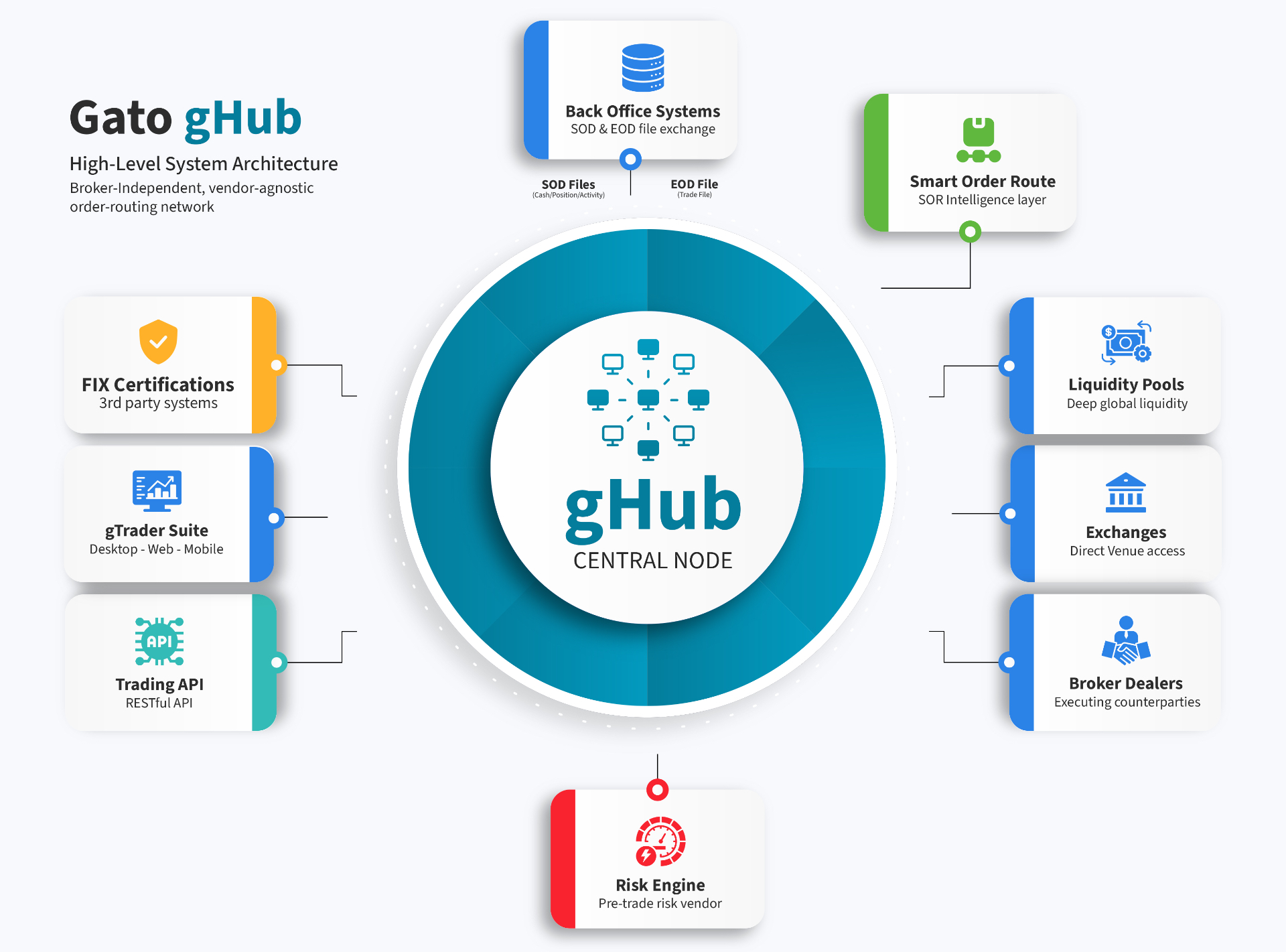
- 01
Single connection
- 02
Fast time-to-market
- 03
Global scalability
- 04
Performance & security
- 05
Built-in compliance
Industry Standard FIX Protocols
Full support for major FIX protocols across asset classes and counterparties.
- Multi-version FIX support
- Customizable message transformation
Secure Connectivity
Hardened transport built for institutional trading.
- X-connect, VPN and TLS 2.0 encryption
- Auto-reconnect with zero manual intervention
DropCopy Send & Receive
Full lifecycle DropCopy with NOE support.
- Real-time send and receive
- Native FIX message queuing
Multi-Asset Coverage
One platform for equities, options, and complex orders.
- Equities, Options and Multi-leg Options
- Unified routing across asset classes
Third-Party Integration
Plug into existing engines over FIX or APIs.
- FIX and REST API connectivity
- Flexible cloud or on-prem deployment
 Next-Gen Trading Platform for Global Markets
Gato gTrader Suite
A multi-asset trading platform that is easy to use. Risk controls are built in. It runs fast on Desktop, Web, and Mobile. Equities, options, futures, and FX sit in one blotter, and every device reads the same order, position, and buying-power record, so a trader who starts an order at the desk can finish it on a phone without a refresh or a second login.
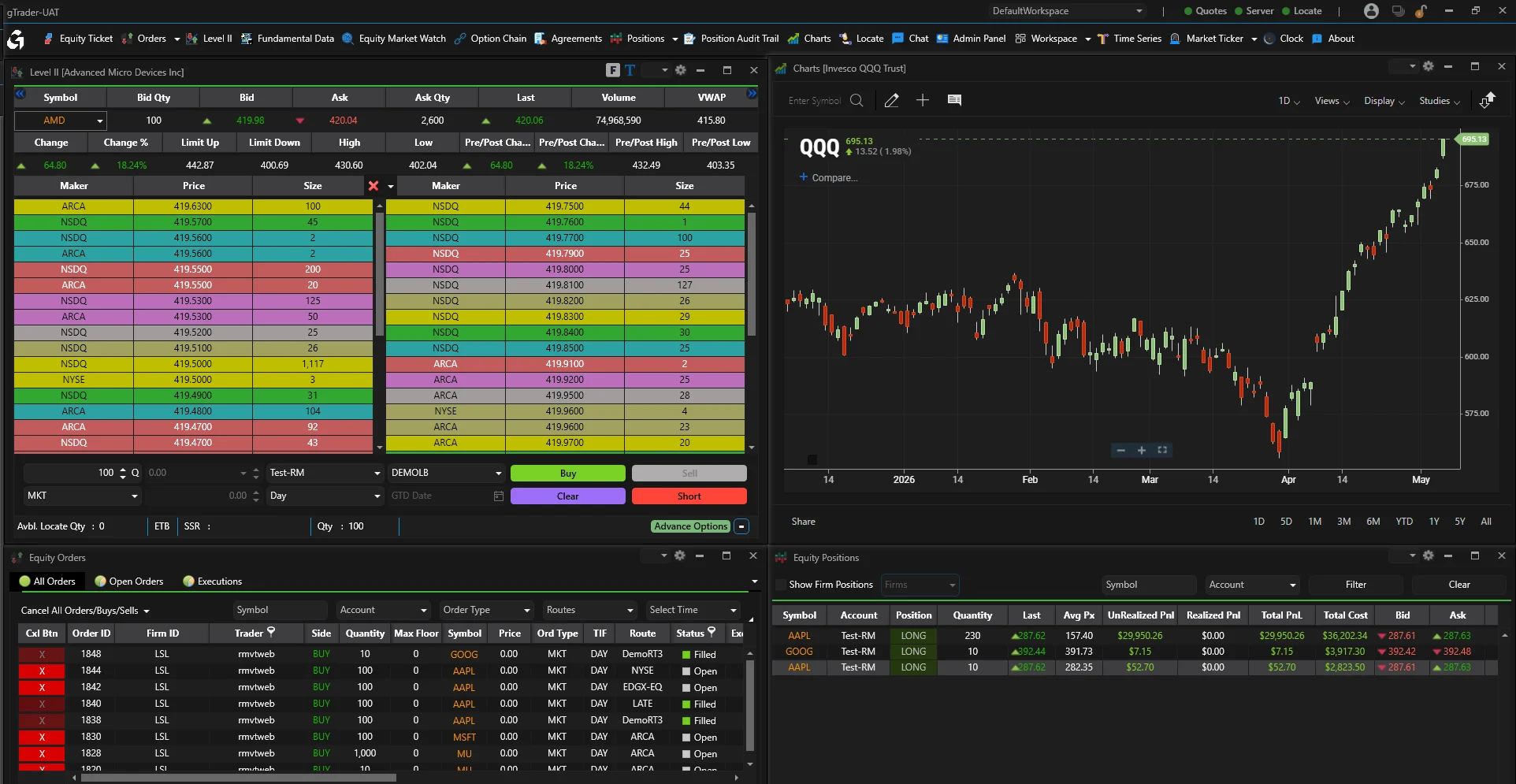
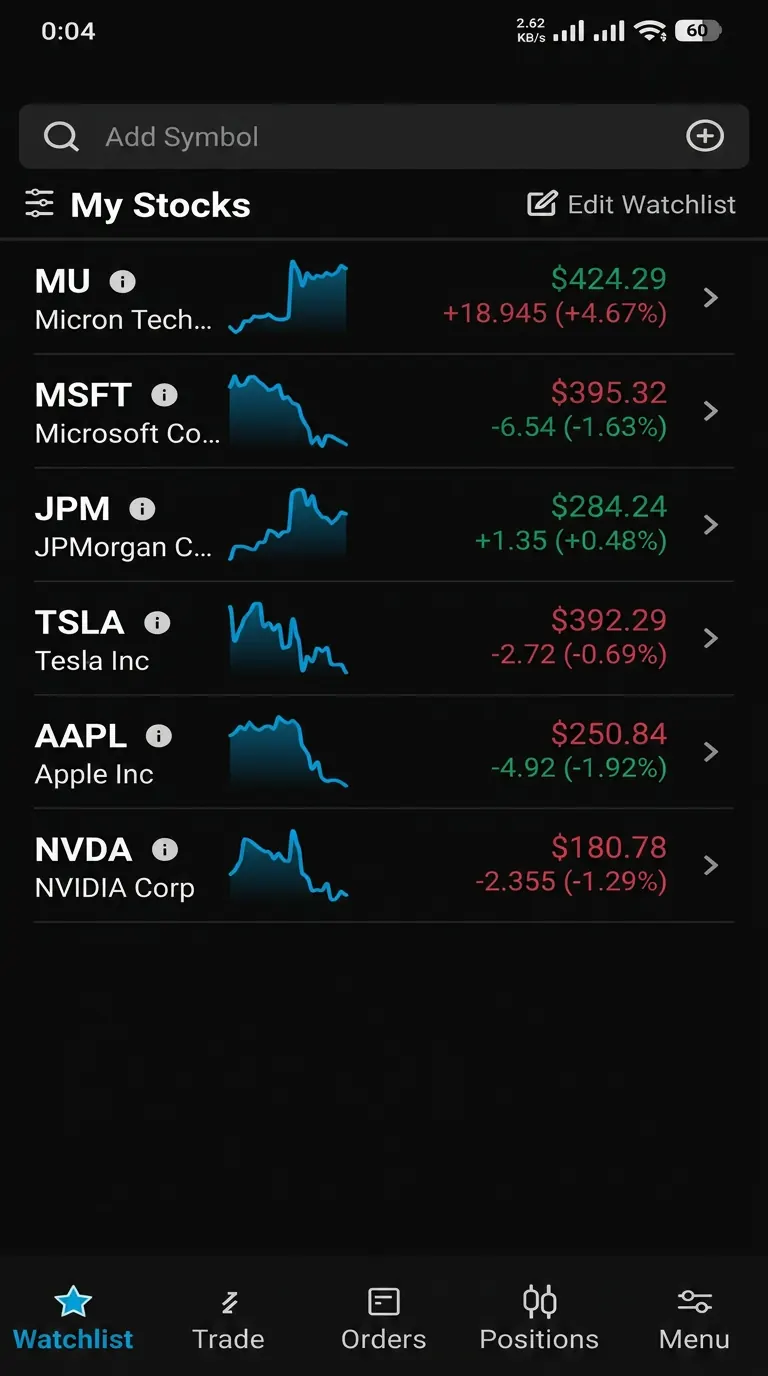
At a Glance
- 01
Full Trading
- 02
Your Setup
- 03
Fast Data
- 04
Portfolio View
- 05
White Label
- 06
Strong Charts
- 07
One Experience
- 08
Built-In Risk
Capabilities
A pro screen for trading equities and options. Fast fills. It grows with you.
Trade many asset types in US and global markets
Real-time Level I and Level II market data
Charts with over 90 studies you can set up
Set your own hot keys and hot buttons
Build your own alerts
Track positions and your whole portfolio
Watch lists you can shape, plus your own alerts
Trade multi-leg options spreads
Set up spread order entry the way you want
See every call and put strike for one symbol
Flag in-the-money options so choices are quicker
API Capabilities
See Trading & Execution in action
Walk through the Trading & Execution modules with our team on a live environment using your own workflows, venues, and reporting obligations.
Trading & Execution Questions
Most execution problems are not speed problems. They are record problems. The order looks one way in the OMS. It looks another way in the front end. It looks different again in the clearing firm's FIX log. One shared order record ends that clean-up work.
Gato's Trading & Execution modules share one order record. Order management, smart routing, market data, and venue links all read it. Sessions, venue profiles, and test templates come preset. So adding a venue is just a setting change. Every child order keeps a routing log compliance can read as is.
That shared record changes daily work. A partial fill shows the same way on the blotter, in risk, and in the reporting feed. Support stops comparing screens. Traders stop asking which one is right.
Connectivity is the other half. Sessions to exchanges, ATSs, market makers, and clearing firms are managed for you. Sequence resets, resends, and throttles are handled by the platform. Your team does not write that code again for each venue.
Routing logic stays in your control. You set venue preferences, blocked venues, and size rules. The router reads live quotes, fees, and past fill quality, then logs the inputs behind each choice.
Front-end coverage matters too. Desks trade equities, listed options, futures, and FX from one blotter on desktop, web, and mobile. Firms that serve end clients use the same deployment with different branding and entitlements.
Risk sits in the order path, not beside it. Credit, capital, size, and price checks run before an order leaves the firm, which is what SEC Rule 15c3-5 asks for.
Market data feeds the same record. Quotes, depth, and option chains arrive once and serve the blotter, the router, and the charts. Nobody wonders which screen has the newer price.
Rollouts stay small on purpose. One desk moves first. The rest keep their current tools. Both read one order record, so positions and buying power agree during the move.
Testing is part of the setup, not an extra project. A UAT space with simulated venues mirrors production. You can replay a trading day and check fills, states, and reports before a session goes live.
Support work drops after go-live. When a trader, a risk officer, and an operations analyst read one record, a question becomes a lookup instead of a comparison of screens.
Do we have to replace our current OMS to use these modules?
No. Most firms start with connectivity or routing and keep their OMS in place. Drop copies flow into the shared order record, so risk and reporting read clean executions from day one.
How is best execution evidence produced?
Each routing choice saves the quotes, fees, and limits that applied at that moment. Reviews read those saved inputs, so no one rebuilds market conditions after the fact.
Which FIX versions and venue types are supported?
FIX 4.2, 4.4, and 5.0 SP2 for routing and drop copy. Sessions run to exchanges, ATSs, market makers, clearing firms, and internal desks. The platform handles session recovery, sequence resets, and throttles.
Your team does not code them.
How does smart order routing decide where an order goes?
Routing reads live quotes, venue fees, and rebates. It also reads past fill quality and your own limits, such as blocked venues. Each choice is saved with the inputs behind it.
That is how you answer best-execution and regulator questions later.
Can the trading front end run alongside an existing OMS?
Yes. gHub can sit in front of your current OMS as a routing hub. It takes drop copies and cleans up executions. Risk, reporting, and post-trade modules then read them.
Many firms run both side by side first. Later they move order management over.
What asset classes can desks trade from one blotter?
US and global equities, listed options, futures, and FX. All from one blotter on desktop, web, and mobile. A shared instrument list keeps positions and exposure in line across asset classes.
How long does it take to add a new venue?
Usually weeks, not quarters.
Venue profiles and certification templates already exist, so most of the work is your side: entitlements, test accounts, and a parallel run to compare fills before the old session is retired.
What happens to the audit trail when an order is routed to several venues?
The parent order and every child route share one record.
Each route keeps the quotes, fees, and limits that applied when the decision was made, so a single order can be reconstructed end to end without stitching logs together.
Explore the rest of the suite
Gato modules work standalone or together — pick another family to continue.
Risk & Compliance
Live pre-trade risk checks plus CAT and CAIS reporting. Compliance grows with your volume, not against it.
Explore familyOperations & Data
Digital onboarding, corporate actions, reporting, and client self-service. One workflow layer that keeps the back office moving.
Explore family